
Before:
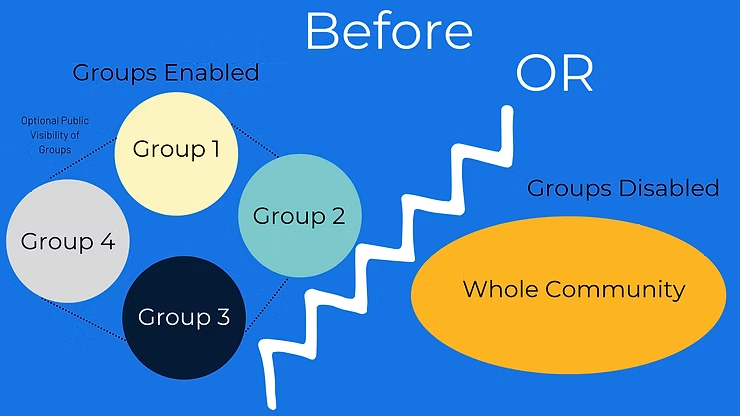
When groups were enabled, you could only work in groups. When they were public, students in other groups could interact with your posts, but all original posts had to go to a group.
Now:
So many more options to configure your Community!
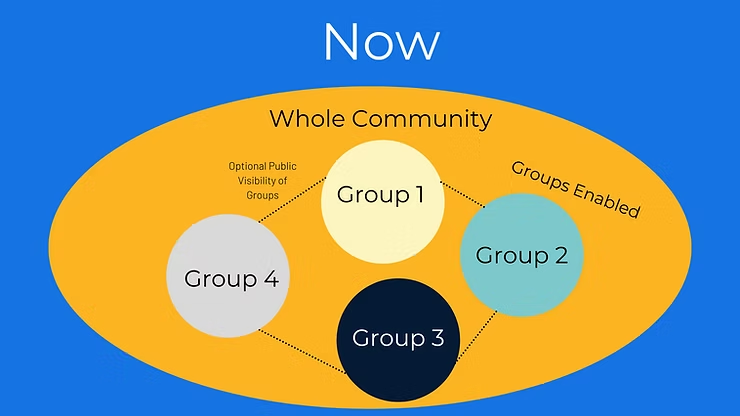
In addition to the system being configurable as it always has been, instructors now have the ability to allow students to share a post to the whole Community, while also keeping group posts private.
This adds the ability to do small group and “breakout” work while still allowing students to interact in the full Community.
With many good applications for groups we also see and hear from instructors that a whole class Community is critical for increasing student engagement, persistence, and improving academic outcomes.
These changes allow you and your students to enjoy the best of both worlds, all in one place.
What does this change from a student experience perspective?
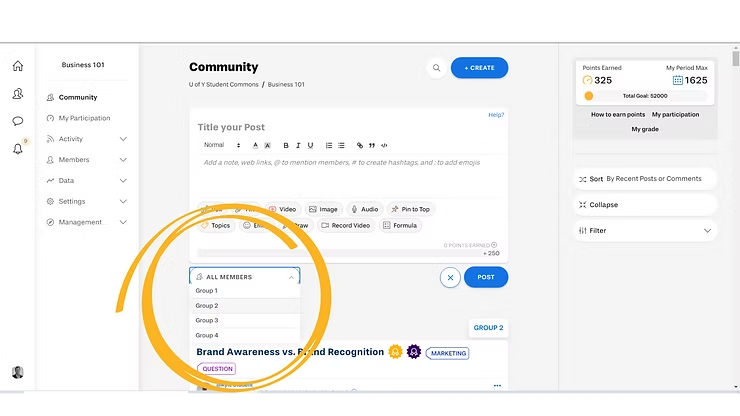
When students post in the community there is now an audience option to select “All members” or “Post to Group XYZ” (instructors and community facilitators can post to any group as seen in the example below).
How to use the new group functions:
Use the entire Community as a space for:
Class participation about class topics
A help forum for students to answer each other’s questions
A spot for students to introduce themselves
A community to socialize in
A place to share relevant current events and articles
A place for graduate students to network professionally
The possibilities are endless!
Use the groups for:
Breakout conversations
Group project collaboration
How can students and instructors navigate between groups?
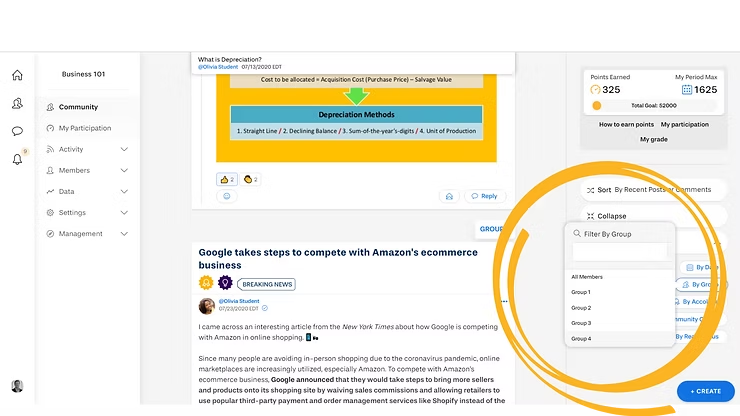
Since Yellowdig Community Feeds are a continuous scroll design, the best way to find almost any specific content is to sort and use the filter feature. You can filter by things like topics, hashtags, date, member, and (of course) groups. Within the feed you and your students can also quickly trigger the group filter by clicking a group tag on any post.
How can I take advantage of the Group feature and public visibility toggle?
A fun use of the group feature is to set the groups as private to start, for a group project or breakout room activity. With groups set as private, anything posted with a group tag will only be seen by group members.
Then, after the assignment has passed, you can toggle the public visibility on. Doing this will enable students to see and discuss how different groups tackled the group assignment, without them being able to “copy” other groups during the assignment.
This gives a great opportunity for reflection and shared learning and is a popular use of the privacy toggle for things like business simulations or science and engineering projects where teams are trying to solve a similar problem.
Tip: Use groups thoughtfully and understand the downsides of small groups
Many people assume small groups will be more engaging and foster closer connections between students. It may seem counterintuitive, but they often don’t.
We’ve learned that having more students to interact with ensures that there is a constant flow of new thoughts and ideas to think about. Intentionally having less students by grouping them can actually create lulls and reduce conversations. With less content to see in small groups, many students check and participate on Yellowdig less or complain of not having enough to talk about.
In larger groups there are also more people to see and make connections with. In a community of 300 compared to 10, for example, there’s much more likelihood people will “match” on shared hobbies, favorite sports teams, or hometowns. That shared ground is often what leads to students building a closer connection more easily.
Our data also show that large communities do not overwhelm students. They participate just as much and rate large communities with similar “recommender scores” as small ones. Some of this is because of Yellowdig’s design, with the single feed design only showing the most recent and talked about posts first.
Students spend hours a day on social media that has way more content than even the most active Yellowdig Community will, due to the sheer volume of users. So, students in large communities understand that they don’t have to consume every post and comment (especially if you explicitly set that expectation). You don’t expect students to take part in every breakout conversation in a classroom, you shouldn’t expect that in Yellowdig. The important thing for their learning is that they are reading good course-related content and talking about it!
For all these reasons, we recommend not using the group feature to ever break up a community of 100 or less. And we recommend using the group functions only as one supplementary part of a larger, on-going course community. This will enable you to see the educational and social advantages of both approaches.
What has stayed the same?
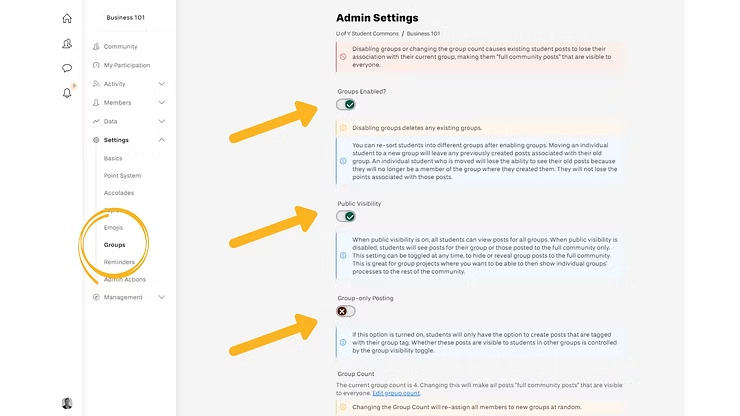
You have always had the ability to enable groups and have always had the option to make them public or private, all of which is still possible. The audience selection functions simply enable group work and a full community experience to exist completely in parallel, and for you or your instructional team to communicate specifically with individual groups.
Can I keep group-only posting with the update?
Yes – you simply need to toggle a switch to enable group-only posting, which will re-enable the same experience you had before the update.
Have technical questions about groups? Check out our knowledge base article – read here.