Why Yellowdig?
At the University of Central Florida (UCF), our division supports faculty and students by leveraging technology, practices, and innovation in online learning. In alignment with UCF’s 2027 strategic plan, we strive to investigate and pilot new technologies with our faculty and students. While searching for a way to improve online student engagement through discussions outside of the traditional LMS, we conducted a pilot with Yellowdig in the Summer and Fall of 2022.
The Creation of a Yellowdig Community
UCF is a large institution. In order to help support over 40 faculty throughout this two-semester pilot, we came up with the idea of creating our own internal Yellowdig community. The idea of having our own pilot community greatly matches the cadence of our culture at UCF.
Visual Verification: UCF faculty prefer seeing how a new tool works ahead of their students. By acting as a “student” in the pilot community, they would be able to emulate how it would appear and function for the students in their own courses.
Testing It Out: It is always reassuring to have a safe space for faculty to play around and test out features without worrying about a notification being sent out to students or accidentally not deleting a test post that students may see.
Community of Practice: By creating a pilot community for all of our participating faculty, this helped not only us as facilitators but also the faculty to have a central location for everyone to ask questions and share ideas. Rather than feeling isolated in this pilot, they could connect with the rest of the pilot participants at any time and receive feedback and ideas from each other. Sometimes the best resource is your fellow peers.
How We Did It
Here are six recommendations that helped make the faculty community successful:
Give each pilot its own YD community. We had a pilot in summer and another for fall, each with different weekly schedules. We decided that having a separate community for each semester pilot would work the best for our faculty. By creating a new community each semester, this would help “reset the stage.” Faculty would not have to be confused by older posts and we could make sure to provide new and improved posts from what we had learned from the first pilot. However, we did make sure to invite the faculty from the first community into the second one to continue sharing their ideas and to stay connected. We communicated through emails for the initial kickoff and evaluation, but everything else occurred within the faculty community. An occasional email during the semester would contain a permalink to a post in the Yellowdig faculty community that we wanted people to respond to.
Create the faculty community as a No Points community. Although we highly endorse the idea of using points in a community to truly replicate the learning environment, for our purposes we wanted to remove one level of confusion for our faculty. Instead of focusing on earning points, we focused more on the methodology and use of Yellowdig, hence our decision.
Offer periodic posts and pin to the top. To help make sure our faculty were receiving the help that they needed throughout the pilot, we created periodic posts in the community. These posts included updates regarding Yellowdig or the pilot, reminders about information we needed from the faculty, and helpful tips to help them become more comfortable using Yellowdig. For each of these weekly posts, we sent out an email to all of the faculty with a permalink to the post. This helped remind faculty to engage with the community.
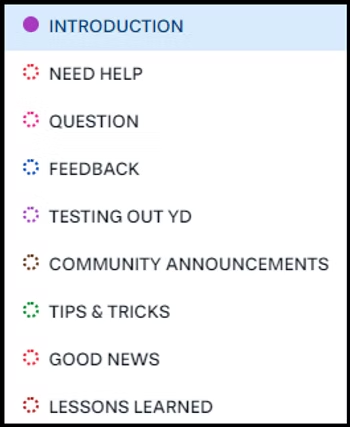
Model the behavior that you want the faculty members to replicate in their own courses. We did this by carefully selecting topics (below), pinning posts, providing introduction posts with video and audio, awarding accolades, using hashtags, and allowing others in the community to respond to each other. We tried not to answer every single question that came in, since we didn’t want to stifle the faculty community. By serving as facilitators, we could better understand what the faculty members were experiencing when they brought us their ideas and questions.
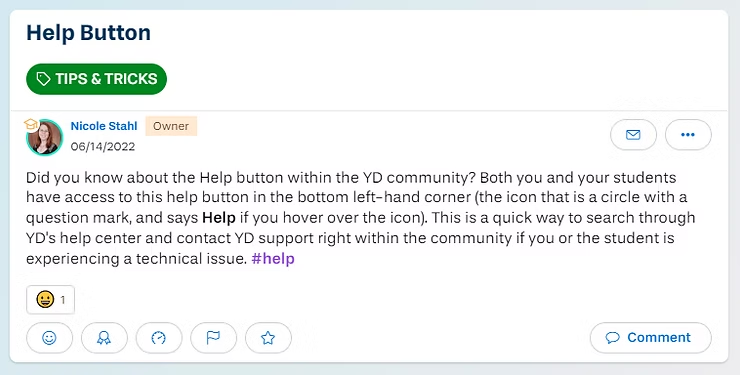
Serve as “liaison” for technical issues. There were two facilitators for this community, which helped us work together to solve problems. It didn’t take long to realize what we could solve and what only Yellowdig Technical Support could solve. This helped take the guesswork out for faculty. Sharing this information within the community helped others know that they were not the only one experiencing an issue. Any major concerns or issues were escalated through tickets to the Yellowdig technical support to have the actual experts tackle those issues so we were not alone in helping our faculty.
Create and/or edit support resources using direct feedback from faculty, based on periodic review of community activity. To get ready for the fall pilot which was going to be larger in scope, we looked at the themes that came up in the summer community and designed a post called “Top 10 Lessons Learned from Faculty” [below – feel free to use/share these lessons with our credit] that we offered to fall faculty before they began teaching that semester. We found that framing it from the faculty perspective lended additional credibility, and helped prepare the teachers for the pedagogical shift that was ahead.
Conclusion
We found the creation of a Yellowdig community for faculty to be a safe space for faculty to ask questions, exchange ideas, and share what’s worked for them. It also serves as an excellent archive to commemorate the topics and trends that arose during the pilot.
Top 10 Lessons Learned From Faculty
By using our own Yellowdig community, we were able to learn a lot about the tool ourselves through our experiences and our interactions with the faculty members. As such, during our pilot we were able to gather a set of lessons learned from our faculty through the use of the community area and our evaluation:
Redesign your discussions to align with this tool. Yellowdig’s strength is cultivating connections and gauging what students are learning, but it does not hold them accountable in the same way a graded discussion does. Use other methods for assessment like essay questions in a quiz or a written assignment.
Be clear on WHY you are using Yellowdig – it creates a space where students can engage with the course content and have conversations that are relevant to their interests.
Use the recommended grade settings. Early on, check that students are reaching benchmarks. If not, intervene early.
Drive home the idea of earning periods and that students must be engaged throughout the semester.
The first week, have students simply familiarize themselves with Yellowdig and post an introduction.
Encourage students to use hashtags, as well as the filtering/sorting features to find posts more easily.
Highlight high quality student posts frequently and early. You can do this by using accolades. You can also link to the post (click on the three little dots to the right of the post and select ‘copy permalink’) and include the link in your own post or even somewhere in Canvas.
Model the behavior you want to see from the students.
Do not expect to be able to keep up and read every single post and comment in the community. It helps to use the sorting/filtering features.
It takes a little while to get used to but you’ll get the hang of it.
About the Authors
Aimee deNoyelles
Aimee has been an instructional designer at UCF for nine years. Highlights include serving as Instructional Design team lead for two years, leading the Quality initiative, and serving as search chair to hire the last eleven IDs. Current interests include textbook affordability, online discussion strategies, and feminist pedagogy.
Nicole Stahl
Nicole Stahl received her Master’s in Instructional Design & Technology at the University of Central Florida, as well as a BA in English Literature. In 2013, she joined the Webcourses@UCF Support team at the Center for Distributed Learning as a technical support assistant. After six years, she transitioned to the Pegasus Innovation Lab (iLab) to serve as the project coordinator. Nicole’s primary focus is to support the iLab’s strategic initiatives through transferring and maintaining data collection, communicating with faculty, staff, and outside partnerships and coordinating plans and details for projects and events.